
Building a Custom Picker with the Sayduck API
Updated: Sep 23
In today’s e-commerce landscape, static images no longer meet customer expectations. Shoppers want to examine products closely, explore details, and feel confident in what they are buying. The Sayduck 3D Viewer delivers exactly that by acting as a digital twin of your physical product. This dynamic visual experience allows colors, materials, and sizes to update in real time. But visualization alone is not enough. True engagement happens when customers are given control.

The Power of Choice
Imagine walking into a car dealership. You don't just want to look at the car; you want to see it in red, with leather seats, or with sport rims. In a digital environment, you need an interface to make those changes happen instantly as the user interacts.
We call this interface the Picker.
Think of the Picker as the remote control for your 3D Viewer. It is the bridge between your customer's desire and the digital product. When a user picks "Blue" on your menu, the Picker sends a signal to the Viewer, which instantly updates the model to show the Blue fabric, or any requested Configuration or Variant change.
The Default Picker vs. The Custom Picker
At Sayduck, we believe in making things easy. That’s why every 3D Viewer comes with a default HTML picker. It generates automatically based on your product data, creating a functional, user-friendly menu with zero design work required, and is there for every product, allowing you to fully engage with the product.

However, one size does not always fit all. Many brands require a user interface that seamless blends with their specific identity. Whether you want a minimalist aesthetic, a unique mobile layout, or specific interaction logic, the Sayduck API allows you to build it.
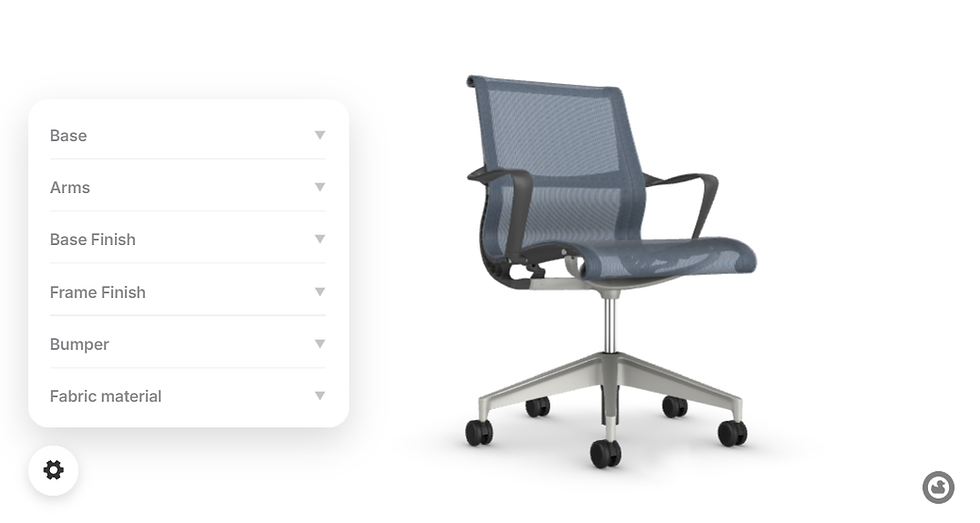
Why Create a Custom Picker?
By bypassing the default menu and building a custom interface, you unlock three key advantages:
Seamless Brand Identity: Ensure the configurator looks like your website, not a plugin. Use your exact colors, fonts, and button styles.
Unique Interactions: Move beyond standard buttons. Build animated dropdowns, visual grids, or step-by-step wizards.
Curated Experiences: Instead of showing every single option at once, you can guide the user through specific "Variant" presets (like "Summer Edition" vs. "Winter Edition").
Understanding the Logic
Building a custom picker follows a standard "recipe." Regardless of the design complexity, the underlying code structure remains the same.
Step 1: The Minimal Embed
Before writing any code, you need the viewer on your page. This is the minimal Sayduck Viewer embed structure. All custom pickers and UI extensions build on top of this.
<div style="min-width:300px;width:100%;height:450px;">
  <sayduck-viewer
    product="3f36f160-bd6d-013e-561e-5aa155b385e1"
    mode="variants"
    background="white"
    hide-picker>
  </sayduck-viewer>
</div>

<script src="<https://viewer.sayduck.com>" type="module" async></script>
Key Element: hide-picker Notice the hide-picker attribute in the code above. This is crucial. It tells the viewer not to load the default Sayduck menu. Since you are building a custom one, you want the default UI disabled to prevent having two menus on the screen at the same time.
Note: Change mode="variants" to mode="configurator" if you are using a Configurator product.
Step 2: The API Lifecycle
To control the viewer, your code must wait until the viewer is fully loaded and ready to receive commands. We do this by listening for the sayduck.api-ready event.
window.addEventListener('sayduck.api-ready', (event) => {
  const api = event.detail.instance;
  // Your custom picker logic goes here
});
Step 3: Data Retrieval & Action
Once the API is ready, the logic flow is simple:
Get Data: Ask the API for available options.
Display: Create HTML buttons for those options.
Action: When a button is clicked, send the update command to the API.
Code Example 1: Variants
For Variants, the goal is to fetch a list of all existing variants (e.g., different color options for the same product) and swap between them.
Minimal Logic
Styling, animations, and layout are intentionally omitted in this snippet to demonstrate the core logic.
window.addEventListener('sayduck.api-ready', (e) => {
  const api = e.detail.instance;

  api.variants.getVariants().forEach(variant => {
    const button = document.createElement('button');
    button.textContent = variant.name;

    button.onclick = () => {
      api.variants.setActiveVariant(variant.uuid);
    };

    document.body.appendChild(button);
  });
});
Complete Styled Solution for Variant product
Here is a fully styled implementation of a Variant product using the logic above. It features a minimalistic design and a collapsible panel.
Code Example 2: Configurators
Configurators are more complex. You are not just listing products; you are listing Configurations (e.g., "Legs", "Fabric") and the Variants within them.
Minimal Logicfor Configurator
Styling, animations, and layout are intentionally omitted.
window.addEventListener('sayduck.api-ready', (e) => {
  const api = e.detail.instance;

  api.configurator.getConfigurations().forEach(config => {
    config.children.forEach(option => {
      const button = document.createElement('button');
      button.textContent = option.name;

      button.onclick = () => {
        api.configurator.setConfigurationValue(config, option);
      };

      document.body.appendChild(button);
    });
  });
});
Complete Styled Solution
Here is a fully styled implementation of a Configurator picker.
Live Demo
See the Configurator code in action. The video below demonstrates the floating menu's elegant design, showing how it saves space while keeping tools accessible. As well you can check more tools at out documentation: https://help.sayduck.com/en/article/3d-viewer-api-documentation-1ftbxnx/
Conclusion
The Sayduck API empowers developers to break free from default constraints. Whether you need a simple variant switcher or a complex, multi-step configurator, the tools are in your hands to build a 3D experience that feels yours authentically.
Ready to build? Sign up for a Demo with us to get started, or try our platform today with a 14-day free trial!
About Sayduck
Sayduck is the leading visualisation platform for design brands and manufacturers to create and showcase products in 3D and Augmented Reality. With offices in Minneapolis, Helsinki and Vilnius, Sayduck helps leading brands like The Optical Foundry, SohoConcept, Ted Bradley Studio, l.a.Eyeworks, and Tempur as well as multiple merchants on e-commerce platforms like Bigcommerce or Shopify to drive product engagement and inspire customer confidence with 3D and AR.
For more information: www.sayduck.com LinkedIn

The beauty of heartfelt poetry lies in its ability to express complicated emotions in a few memorable lines. A poem can remind readers of meaningful relationships, important Emotional Shayari decisions, or experiences that changed their outlook on life. I like Shayari that feels honest and thoughtful rather than overly dramatic. When words reflect genuine emotions, they become easier to relate to and create a more enjoyable experience for readers.
I like how this article explains the idea of building a custom picker around the Sayduck 3D Viewer. Being able to change options and see the results instantly makes the experience much more interactive, and I think the same principle applies to gaming. Players enjoy having control over character appearances, skins, equipment, and other customization options that make a game feel more personal. A well-designed interface can make those choices feel natural instead of turning them into a chore. It even reminds me of how players explore new versions and features through things like FF Beta Download. In the end, whether it's a 3D product or a game, giving people more freedom to customize their experience can make it much…
I really like how this article explains the value of giving users more control over interactive 3D experiences. The ability to customize options, switch between variants, and create a picker that fits the overall design makes the experience feel much more engaging. I see a similar idea in game development, where customization and intuitive interfaces help players feel more connected to the world they’re exploring. I enjoy discovering new gaming experiences through https://ffbetadl.com/, and it’s interesting to see how thoughtful design and interactive technology can make digital experiences more immersive and enjoyable.
Interesante repaso de los avances médicos. Me pregunto si estas novedades ya se están aplicando en entornos clínicos reales o si aún están en fase experimental. Por cierto, para quienes buscan herramientas digitales de seguimiento de salud, he probado dialed y me ha parecido práctica, aunque conviene contrastarla con el criterio profesional.
Set hide-picker on a configurator build and the viewer still rendered its default menu until we swapped mode from variants to configurator. The sayduck.api-ready event also fired twice on iOS, doubling every button. That 3f36f160-bd6d-013e-561e-5aa155b385e1 product ID in the embed is the one I tested. While debugging, if you're tracking Pokemon card values across sets, the same getVariants/setActiveVariant loop applies.